Freelance Invoice Templates

Supercharge your freelance journey with Refrens hassle-free freelance invoice templates! Our invoice templates are crafted for freelancers like you – simple, professional, and ready to use. Create polished invoices in minutes, leaving you more time for what you do best – delivering exceptional work.

Freelancers Rate Refrens Invoice⭐ 4.8/5 based on 11700+ Ratings

Freelance invoice template (Add invoice details, customize the template, and download the PDF.)

1
Add Invoice Details
2
Design & Share (optional)
Invoice Form
1
Add Invoice Details
2
Design & Share (optional)

Freelance Invoice Template in Word

Downloadable invoice designs suited for writers, designers, developers & more
Freelance Invoice Template
Invoice for Freelance Work
Freelancer Invoice Template
Freelance Invoice
Freelance Invoice

Freelance Invoice Template in Excel

Ready-to-edit spreadsheets designed for freelancers across industries
Invoice Templates for Freelancers
 Invoice  Template for Freelancers
Freelance Invoice Template
Invoice for Freelance Work
Freelancer Invoice Template
Freelancer Invoice Template Excel
Get Your Free Freelance Invoice Template TodayCreate Invoice Now

Invoice Template for Freelancers

What should be on a freelance invoice?

Crafting an effective freelance invoice is key to ensuring smooth transactions and timely payments. Here's a breakdown of the essential elements that should feature on your freelance invoice:

Date of Invoice: Initiate with the date of the invoice, a fundamental detail for both you and your client to track payment timelines.

Issuer's Information: Include comprehensive details about your freelance enterprise, such as your name, business name, and contact information. This builds trust and provides clarity.

Recipient's Details: Specify the recipient's information – the individual or company responsible for the payment. This ensures accuracy and avoids any confusion in processing payments.

Service Description: Provide a detailed description of the services rendered. This not only aids in transparent communication but also serves as a reference point for both parties.

Date of Service: Highlight the date on which the services were provided. This chronological detail adds context and helps in reconciling the invoice with the actual work done.

Cost Breakdown: Clearly outline the charges for each service provided. A comprehensive breakdown not only showcases transparency but also helps in justifying the total amount billed.

Total Amount Owed: Summarize the total amount owed at the end of the invoice. This is the key figure that your client will use for payment processing.

You can easily set a clear and detailed record of your services and the corresponding charges, using the freelancer's invoice templates. To further streamline your invoicing process, consider exploring freelance invoice templates or utilizing billing software. These tools can enhance efficiency, reduce errors, and contribute to a more professional invoicing experience for both you and your clients.
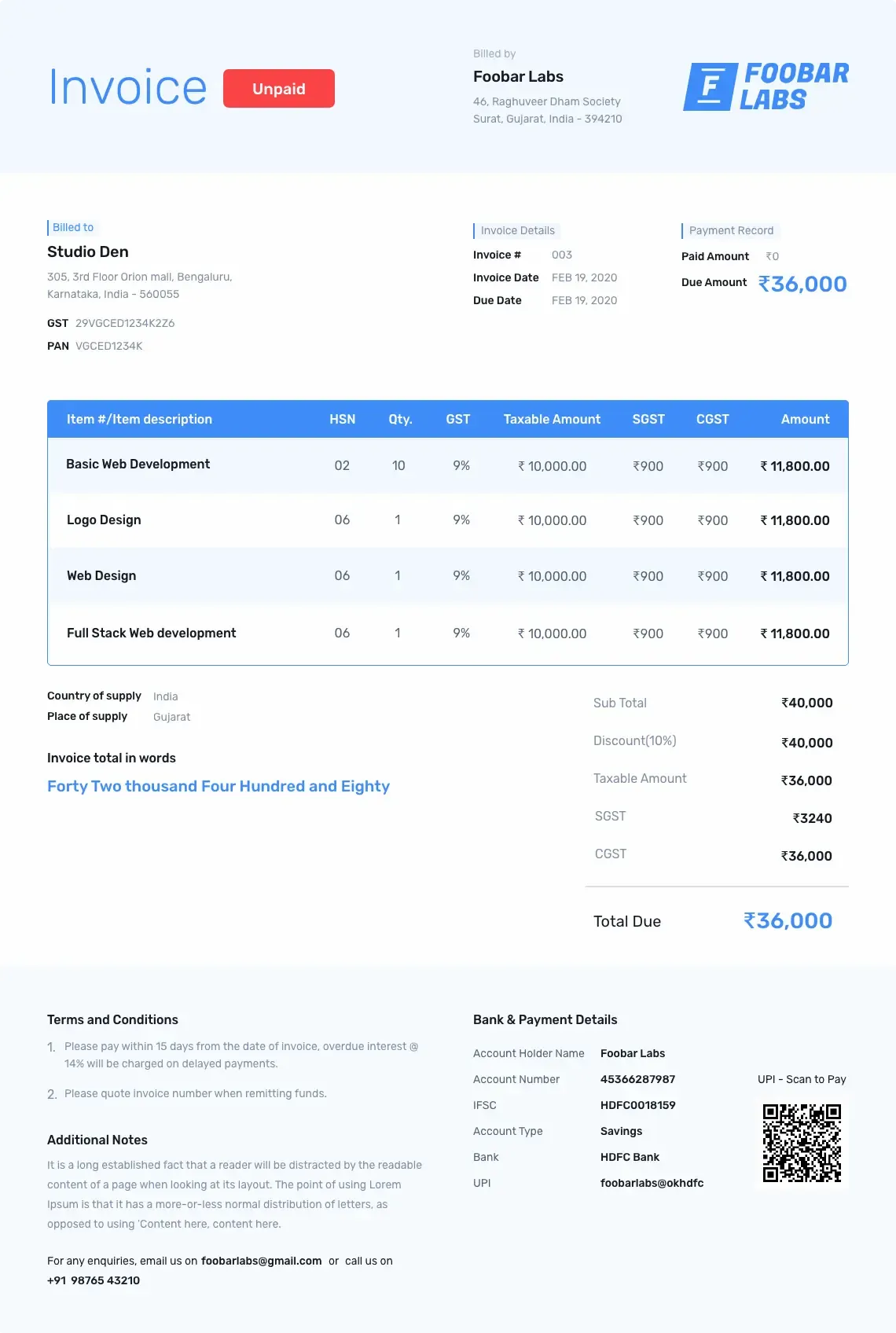
Sample freelance invoice template in blue and white color with payment code and link

Pain points of freelance invoicing

I spoke with multiple freelancers on Reddit and LinkedIn groups and noticed a clear pattern. Most freelancers struggle with three major problems when they create a freelance invoice template or send an invoice for freelance work. These problems slow down payments and increase stress.

Let me explain each point in a simple and clear way.

1. Time and administrative burden

Manual and repetitive work - Freelancers face this issue the most: manual and repetitive work. Most freelancers still create invoices from scratch using Word or Excel. They duplicate an old file, delete the existing details, and update new client information, line items, and rates. This feels slow and dull because every invoice needs fresh edits.

This problem grows when the client workflow changes. A freelancer may need to add new fields, change sections, or adjust the freelance invoice template completely. Word and Excel cannot automate any of this, so freelancers spend too much time formatting instead of working on paid projects.

Refrens invoicing software solves this by automating more than 95% of a freelancer’s invoicing work. You can save client details, reuse previous templates, and store common line items. You can create a tax invoice with one click, convert a quotation to an invoice instantly, and add custom fields without editing layouts manually. Refrens also automates repetitive tasks like sharing invoices through WhatsApp or email, scheduling invoices, and setting up recurring invoices. This removes the manual effort and helps freelancers send invoices faster.

Tracking and managing payments - Freelancers struggle to track payments when they use a basic freelance invoice template. There is no way to check whether the client opened the invoice, whether the payment is received, or which invoices are still outstanding. If the client pays online, freelancers also find it hard to track transaction charges and the exact amount received. They do not know where to record the payment, how to track profitability, or how to prepare for taxes. All this leads to confusion because every detail sits in different files, sheets, or messages.

Refrens freelance invoicing solves this by helping freelancers create, share, track, and manage payments from one dashboard. The interface is simple, so even beginners can use it without any accounting knowledge. You can check whether the client opened the invoice and track payment status in real time. When a client pays online, the received amount reflects on the dashboard instantly. Refrens also highlights pending invoices, overdue invoices, and paid invoices clearly. This removes the manual checking and helps freelancers stay on top of their receivables without effort.

Client requirements - Client requirements often cause invoice rejections. This happens when the freelance invoice template you send does not match the company’s internal format. Some clients follow strict rules for layout, line items, or approval structure. If the format does not match, they reject the invoice. Other common issues include mismatched payment terms, missing fields, unsupported currencies, or incorrect tax structure. These errors delay payments and create friction in the workflow.

Refrens solves this by giving freelancers full control over customization. You can adjust the invoice layout, add or remove fields, and match the client’s preferred structure with a few clicks. Refrens supports invoicing for 170+ countries and 150+ currencies, so you can bill the client in their preferred currency without doing manual conversions. Payment terms and tax settings can be updated instantly for each client.

You can also store different invoice templates for different clients. This helps you follow each client’s internal process without rebuilding the invoice every time. Refrens templates allow you to maintain your branding while meeting every client requirement. This makes invoicing faster, reduces rejections, and helps freelancers maintain a professional image.

Invoicing errors - This is one of the common mistakes every freelancer has made once in their life. Manual data entry increases the risk of typos, incorrect amounts, or missed tax information, which can delay payments. And making changes in Word freelance invoice or Excel freelance invoice is very hard and chances of getting error increases.

2. Client related challenges

Chasing payments - Chasing payments is one of the biggest challenges freelancers deal with. Even after you deliver the work, many clients delay payments or push the due date without a valid reason. The awkward part is the follow-up. Many freelancers hesitate to remind clients repeatedly because it can affect the working relationship. As a result, payments get stuck, cash flow gets affected, and the freelancer ends up feeling frustrated.

Refrens removes this awkwardness by automating the entire follow-up process. You can schedule multiple payment reminders in advance. Refrens sends these reminders on email and WhatsApp without making you follow up manually. You can also track whether the client opened the invoice, which gives you clarity on whether the client has seen the request or not.

Refrens also introduced Early Pay Discounts, a feature used widely by freelancers. This adds a countdown timer on the invoice. If the client pays within the time limit, they get a small discount. This creates a sense of urgency for the client and helps freelancers get paid faster. Many freelancers use this feature to reduce delays and improve their cash flow.

3. Financial and accounting issues

Many freelancers struggle with taxation, financial tracking, and accounting. Taxes feel confusing because there is no clear system to record income, expenses, or deductions. Manually handling finances becomes even harder when freelancers depend on Word or Excel for invoicing. There is no automation. There is no structured financial record. Everything feels scattered.

Some invoicing and accounting tools also feel too complex or too expensive for solo freelancers. These tools add more confusion instead of helping. This leads to another common problem and that is lack of financial control. Freelancers do not get a clear view of how much they earned, how much they spent, which invoices are unpaid, or how much tax they owe.

Refrens solves these issues with a simple and easy cloud accounting software. Even a beginner can manage accounting on Refrens without dealing with complexity. The software automates most tax-related entries. You get an instant view of Profit and Loss, reports, and general ledger without doing manual work.

Refrens lets freelancers create quotations, GST billing, and fully customizable invoice formats designed specifically for freelancers, small businesses, and SMEs in India. Everything stays in one place. This gives freelancers full control over their finances without feeling overwhelmed.

Who can use Refrens freelance invoice templates?

Refrens freelance invoice templates work for every service-based freelancer. The templates fit any workflow because they support customization, hourly billing, project-based billing, retainers, multi-currency invoicing, and automated payment tracking. Here is how different freelancers can use these templates:

IT service provider

IT freelancers deal with project milestones, hourly tasks, maintenance retainers, and international clients. Refrens helps them create clean invoices with item-wise service descriptions, custom fields for sprints or modules, multi-currency support, and automated payment reminders so they get paid faster.

Photography freelancer

Photographers need to add package details, shoot hours, location charges, equipment charges, and editing fees. Refrens allows them to add grouped line items, custom descriptions, advance payment details, and deliverable timelines to reduce disputes and ensure clarity.

Videography freelancer

Videographers work with large project scopes involving pre-production, shoot days, equipment rentals, crew charges, and editing milestones. Refrens makes it easy to itemize all these costs clearly so clients understand what they are paying for.

Social media freelancer

Social media freelancers bill monthly retainers, content packages, and performance bonuses. Refrens templates help them set up recurring invoices, define deliverables clearly, and track payments across multiple clients without the chaos of manual work.

Digital marketing freelancer

Digital marketers must show ad spend, service fees, platform charges, and campaign breakdowns. Refrens enables clean separation of these items with group-wise sections, custom tax rules, and easy-to-read templates that clients trust.

Graphic designing freelancer

Designers need flexibility because every project is different. Refrens lets them add concepts, revisions, design packages, hourly tasks, and final deliverables without changing the core template every time.

Content writing freelancer

Writers invoice by word count, per article, per blog, or monthly package. Refrens helps them add units, word-based pricing, project names, and client-wise templates so they do not need to recreate invoices for every new assignment.

Web development freelancer

Developers follow milestone-based billing. Refrens supports milestone invoicing with sectional line items for UI, backend, integrations, hosting, or maintenance. They can track payments and link invoices to related quotations for better financial control.

Consulting freelancer

Consultants use hourly billing, session-based billing, or project retainers. Refrens templates allow them to define clear consulting hours, session blocks, and payment terms. They can set automated reminders to remove follow-up stress.

You can also pick templates for specific use cases. These templates help you create clear documents without confusion.

Quotation format

You can create a quotation before you start any project. The quotation format helps you share prices, timelines, and service details with your client. You can download it or create it online.

Sales invoice format

You can use this format if you sell products or services. The sales invoice format includes tax details, item lists, and payment terms. It helps you share a clean bill with your customer.

Construction invoice format

This invoice format works well for construction projects. You can add material costs, labour costs, equipment charges, and project milestones. Contractors and agencies can use this format to bill their clients clearly.

What are the benefits of using a freelance invoice template?

Detailed Line Items Our freelance invoice templates allow you to break down services and products into detailed line items. Each service or product can be itemized, providing clear descriptions and costs. This level of detail ensures your clients understand exactly what they are paying for, which helps to reduce the risk of payment disputes. Detailed line items also make it easier for clients to see the value of your work, justifying the costs and enhancing transparency.

Client Management Managing multiple clients can be challenging, but our freelance invoice templates make it easier. Each template is designed to help you keep track of client details and invoice history. You can store client names, addresses, contact information, and a record of all previous invoices. This organization helps you quickly reference past work and streamline your billing process, ensuring no client is forgotten and every invoice is accounted for.

Brand Consistency Maintaining a consistent brand image is important for building trust and professionalism. Our freelance invoice templates allow you to customize each invoice with your logo, brand colors, and fonts. This customization helps ensure that every invoice you send reflects your brand's identity. A consistent brand image across all communications, including invoices, reinforces your professionalism and can leave a positive impression on your clients.

Quick Invoice Generation Time is valuable for freelancers, and our ready-to-use invoice templates save you time. You can create and send invoices in minutes, freeing up more time for your core work. By using our freelance invoice format, you can quickly fill in the necessary details, customize the template to fit your needs, and send it off to your client. This efficiency reduces the administrative burden and allows you to focus on delivering your services.

Mobile-Friendly In today's fast-paced world, being able to work on the go is crucial. Our freelance invoice templates are optimized for mobile devices, so you can create and send invoices anytime, anywhere. Whether you are traveling, meeting a client, or working from a coffee shop, you can access your templates and manage your invoicing needs with ease. This flexibility ensures you never miss an opportunity to bill your clients promptly, keeping your cash flow steady.

Customization Options Flexibility is a key feature of our freelance invoice templates. You can add additional fields or columns for shipping details, discounts, extra charges, and custom fields for both client and product or service line items. This adaptability ensures that the template fits your specific invoicing requirements perfectly. Whether you need to include special terms, add notes, or adjust pricing details, the customization options provide you with the flexibility to tailor each invoice to your exact needs.

Professional Appearance Using a well-designed freelance invoice template conveys professionalism and attention to detail. It demonstrates to your clients that you take your business seriously, which can enhance your credibility and lead to more repeat business and referrals. A professional appearance not only impresses clients but also sets you apart from competitors who might use generic or unprofessional invoicing methods.

Easy Record Keeping Our freelance invoice templates make record-keeping effortless. With organized and detailed invoices, you can easily track payments, manage financial records, and prepare for tax season. This systematic approach reduces the risk of errors and makes financial management straightforward. You can quickly access past invoices, see payment statuses, and generate reports, making your bookkeeping tasks simpler and more efficient.

Enhanced Communication Clear and professional invoices facilitate better communication with clients. By providing all necessary information in a structured format, you minimize back-and-forth queries and ensure that clients have all the details they need to process payments quickly. Enhanced communication helps in building strong client relationships, as it reflects your commitment to transparency and clarity in your business dealings.

Improved Cash Flow Timely invoicing is crucial for maintaining a healthy cash flow. Our freelance invoice templates help you send out invoices promptly, which in turn encourages timely payments from clients. Consistent and efficient invoicing practices can significantly improve your cash flow and financial stability. By ensuring that your invoices are sent out on time and are easy for clients to understand and process, you reduce the chances of payment delays and improve your overall financial health.

User-Friendly Interface Our freelance invoice templates are designed with user-friendliness in mind. The intuitive interface allows you to create invoices with minimal effort, even if you're not tech-savvy. This ease of use means you can quickly adapt to the system and start benefiting from the streamlined invoicing process without a steep learning curve.

Cost-Effective Solution Investing in professional freelance invoice templates is a cost-effective solution for your invoicing needs. Instead of spending hours creating invoices from scratch or paying for expensive invoicing software, our templates offer a budget-friendly alternative that doesn't compromise on quality or functionality.

Frequently Asked Questions (FAQ)

Yes, you can add a logo to the invoice and can also change the color of your invoice template, matching your logo.

Yes, Refrens invoice templates are customizable. You can add additional fields or columns like shipping details, discounts, additional charges, custom fields for both client and product or service line item.

Yes. You can easily download it in PDF format or can click on the print option and can save as PDF.

You can create 15 documents on Refrens for absolutely free. Once the threshold of 15 documents is reached, you can buy our premium plans to keep continue creating the documents.

Creating an account on Refrens is necessary to use the free invoice templates. After signing up, you can access all the invoices in one place which makes managing your business invoices a lot easier.

Payment Options


Made with and in Bengaluru.

Refrens Internet Pvt. Ltd. | All Rights Reserved
This site is protected by reCAPTCHA and the Google Privacy Policy and Terms of Service apply.
Refrens ISO Certificate